


DistroClone Backup & Restore
In the development of SysLinuxOS, one recurring need was a reliable way to snapshot and restore a system quickly — not just for users, but also during testing and ISO development.
That is how DistroClone Backup & Restore was born: a graphical, incremental backup tool designed specifically for Debian-based systems.
It is the companion utility to DistroClone Live ISO Builder, and both tools will ship together as part of the SysLinuxOS toolchain in upcoming releases. They are designed to work independently, but their real strength emerges when used together — something I will cover in a future article.
What DistroClone Backup Does
DistroClone Backup & Restore is a GTK/YAD-based graphical frontend that creates and manages backups of the system root filesystem (rootfs) across Debian-based distributions such as:
- Debian
- Ubuntu
- Linux Mint / LMDE
- Elementary OS
- Zorin OS
- SysLinuxOS
- and derivatives
It allows you to create a full baseline backup, then maintain it with fast incremental updates. If something breaks — a bad update, a misconfigured service, or an experimental package — the system can be restored in minutes.
When the backup cache is stored on btrfs, the tool also enables versioned snapshots with configurable retention.
Key Features
Full system clone
The first backup is a complete rsync clone of the root filesystem. This becomes the reference state for all future incremental runs.
Incremental backups
Subsequent backups transfer only modified files, making them both fast and space-efficient.
Safe system restore
During restore operations, critical user data is always protected:
/home/root/boot/efi
Built-in scheduler
Backups can be scheduled directly from the GUI (daily, weekly, monthly) without manually editing crontab.
Btrfs snapshot versioning
If the cache directory resides on a btrfs filesystem, each backup generates a read-only snapshot, allowing rollbacks to previous states.
Desktop notifications
Optional notify-send alerts inform you when scheduled backups complete.
Flexible backup destination
The cache directory can be placed on:
- internal disks
- external USB drives
- NFS mounts for offsite storage
Real-time logging
All operations are streamed live in the GUI and stored in:
Multilingual interface
The interface language is automatically selected based on the system LANG variable. Currently supported:
English, Italian, German, French, Spanish.
Requirements
- A Debian-based system
(Debian 12+, Ubuntu 22.04+, Mint, LMDE, Elementary, Zorin OS 18, SysLinuxOS) - 5–15 GB of free space on the backup destination
- Automatically installed dependencies:
yadrsyncimagemagick
Optional but recommended:
btrfs-progsfor snapshot versioning
Installation
Download the latest .deb package:
wget https://github.com/fconidi/distroClone-backup/releases/download/v1.2/distroclone-backup_1.3.4_all.debInstall it:
sudo dpkg -i distroclone-backup_1.3.4_all.debsudo apt install -fsudo apt install btrfs-progsFirst Launch
You can start the application from the system menu or directly from a terminal
distroClone-backupThe main dashboard shows:
- detected distribution
- running kernel
- cache status
- active scheduled jobs
Configuring the Backup Cache
By default, backups are stored under /mnt. This can be changed in Settings, allowing you to point the cache to an external drive or a network mount.
The tool automatically creates the working directory:
.rootfs_cache
Creating the First Backup
A full backup must be performed before incremental backups can be used.
When you click Full Backup, the tool clones the root filesystem into:
<cache-dir>/<distro>_live/.rootfs_cache
Scheduling Automatic Backups
From the scheduler dialog you can define:
- frequency (daily, weekly, monthly)
- execution time
- optional desktop notification
The tool writes the corresponding entry directly into the root crontab, so no manual configuration is required.
A silent incremental run — the same mode used by cron — can be triggered manually with:
distroClone-backup --incremental-silentRestoring the System
The restore dialog shows:
- backup timestamp
- stored distribution and kernel
- cache size
- protected paths
Once confirmed, rsync runs in reverse, copying files from the cache back into the root filesystem. A reboot is required after completion.
If the cache resides on btrfs, you can instead select Restore from Snapshot and roll back to any previously stored state.
How It Works Internally
From a technical standpoint, the workflow is straightforward and transparent:
- Full backup
rsyncclones the root filesystem while excluding virtual filesystems (/proc,/sys,/dev), temporary directories, and caches. - Incremental backup
rsync --checksumdetects and transfers only modified files compared to the cached baseline. - Snapshot creation
On btrfs, each backup generates a read-only snapshot named:
- Restore process
The restore operation is simply rsync executed in reverse, with explicit exclusions for user and boot data. - Scheduling
Cron entries are written programmatically by piping the current crontab throughcrontab -land appending the new job.
Part of the DistroClone Ecosystem
DistroClone Backup is not meant to replace tools like Timeshift or full disk imaging solutions. Instead, it fills a specific niche:
- fast rootfs cloning
- incremental state tracking
- tight integration with ISO remastering workflows
This makes it particularly useful for:
- distribution developers
- system integrators
- power users who frequently experiment with their systems
DistroClone Backup & Restore will continue evolving alongside the DistroClone toolchain and SysLinuxOS. Future posts will dive deeper into how the backup cache can be reused directly during ISO generation and system migration.
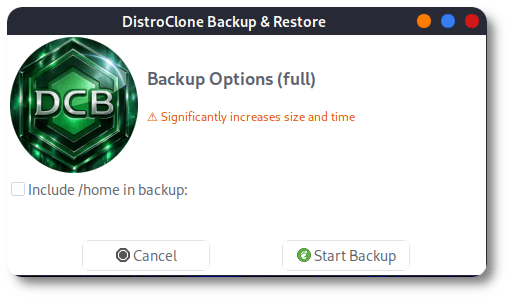
DistroClone Backup & Restore
enjoy 😉
Pingback: Build a Live ISO from DistroClone Backup Cache - SysLinuxOS