DistroClone USB persistent live USB sharing and encryption
Create a persistent live USB with DistroClone USB 0.3.1: installation, Shared files, LUKS2 encryption, BIOS/UEFI boot and checks.

Create a persistent live USB with DistroClone USB 0.3.1: installation, Shared files, LUKS2 encryption, BIOS/UEFI boot and checks.
When you connect to a network you do not control, or you simply do not want your provider to see which sites you visit, your traffic has to go through Tor. SysLinuxOS Anonimo does it with one click: every TCP connection and every DNS query of the computer goes through Tor, and all other traffic to the Internet is blocked.… Leggi tutto »SysLinuxOS Anonimo secure internet browsing
Install and use SysLinuxOS Boot Repair from Live USB: read-only inspection, BIOS and UEFI GRUB recovery, LUKS roots, Btrfs, and snapshots.
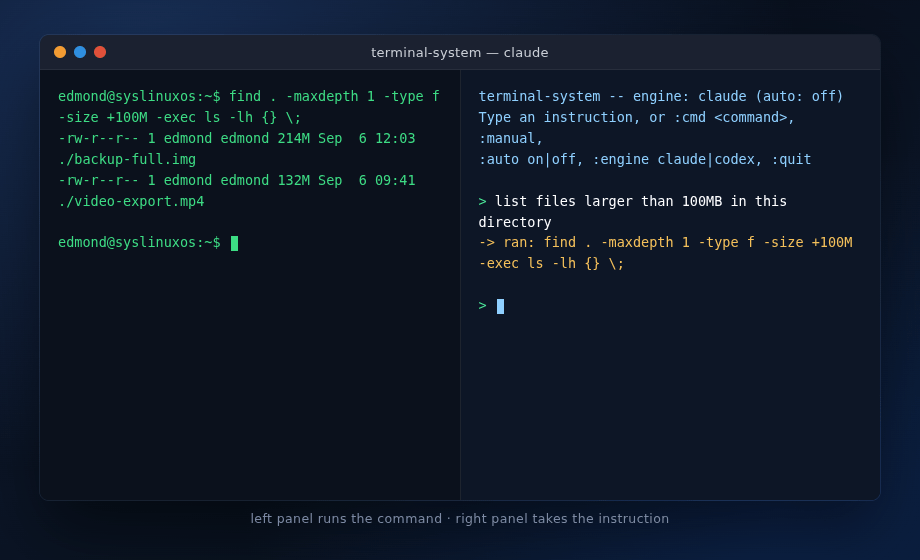
How many times have you had a problem on your Linux system and knew exactly what you wanted to do, but not the exact command, the right flags, or the syntax of that one tool you use once every six months? terminal-system exists for that: describe the problem in natural language, an AI assistant (Claude Code or Codex, called non-interactively… Leggi tutto »Terminal-system AI assistant (Claude Code, Codex) for your Linux system
SysLinuxOS – Snapshot Management Guide 1. Introduction SysLinuxOS 13.2 uses btrfs as its default filesystem and integrates snapper, grub-btrfs, and the syslinuxos-rollback helper to provide automatic, GRUB-bootable filesystem snapshots. Every time the system is updated or a snapshot is created manually, a copy of the root filesystem is stored in /.snapshots. These snapshots appear as boot entries in the… Leggi tutto »SysLinuxOS Snapshot Management Guide
SysLinuxOS 13.2 there was no more time This release is not a simple update, but it is the “14” version that I had in mind, a real epochal change. There was no more time and I didn’t want to wait any longer. SysLinuxOS 13.2 is a substantial revision of how the system handles storage, backups, recovery, and boot. The release… Leggi tutto »SysLinuxOS 13.2 Revolution
distroClone and distroClone-backup: A Complete System Protection Strategy for Debian-Based Distributions Anyone maintaining a customised GNU/Linux system eventually faces two distinct but related needs: a reliable backup to restore from in case of failure, and a bootable live ISO to deploy on new machines or preserve as a system snapshot. Until now, covering both scenarios required separate tools and manual… Leggi tutto »Guide to distroClone and distroClone-backup
DistroClone Backup & Restore In the development of SysLinuxOS, one recurring need was a reliable way to snapshot and restore a system quickly — not just for users, but also during testing and ISO development.That is how DistroClone Backup & Restore was born: a graphical, incremental backup tool designed specifically for Debian-based systems. It is the companion utility to DistroClone… Leggi tutto »DistroClone Backup & Restore
SysLinuxOS 12.4 released. SysLinuxOS is updated to version 12.4. In this version, several bugs have been fixed and it also brings with it several improvements to make it much more intuitive and easy to use. Solved problems about repository, and with new kernel 6.7, are the biggest news. Many changes are under the hood, while others are purely aesthetic, and… Leggi tutto »SysLinuxOS 12.4 released
To create VLANs in SysLinuxOS and Debian GNU/Linux using the “ip” command, follow these steps: 1) Install the “vlan” package by running the following command: sudo apt-get install vlan 2) Load the 8021q kernel module using the “modprobe” command: sudo modprobe 8021q Verify that the module is loaded by running: lsmod | grep 8021q The output should be similar to:… Leggi tutto »How to create VLAN in Linux using the ip command
