

When you connect to a network you do not control, or you simply do not want your provider to see which sites you visit, your traffic has to go through Tor. SysLinuxOS Anonimo does it with one click: every TCP connection and every DNS query of the computer goes through Tor, and all other traffic to the Internet is blocked.
Version 2026.10.1 is available for SysLinuxOS 13 and Debian 13, with a window, a notification-area icon and a command-line tool. The interface supports English, Italian, French, German and Spanish and follows the session language. It is written from scratch for SysLinuxOS, inspired by AnonSurf but sharing none of its code.
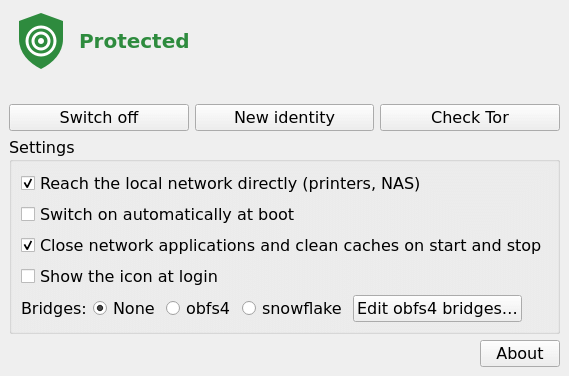
SysLinuxOS Anonimo with protection on
How it works
Anonimo does not change your existing network setup. When you switch it on it adds its own nftables table, inet anonimo, and starts its own Tor instance (syslinuxos-anonimo-tor.service). When you switch it off the table is removed and the network is exactly as before.
ufw, Docker and libvirt rules: never touched.
System Tor: /etc/tor/torrc is left alone.
DNS: /etc/resolv.conf and NetworkManager are not edited; DNS is redirected to Tor by the firewall.
If Tor stops: traffic to the Internet stays blocked instead of leaving in the clear.
If nftables is reloaded: anonimo’s table is loaded again at once. After loading nftables rules by hand (nft -f), run anonimo start again.
Requirements
SysLinuxOS 13 or Debian 13 (or a derivative) with a graphical desktop and a polkit authentication agent in the session, which MATE and GNOME normally include. The APT package brings Tor, nftables, obfs4proxy, Python, PyQt5 and pkexec. It was tested on SysLinuxOS 13 with MATE, GNOME and GNOME Classic; it has not been tried on plain Debian or on Ubuntu.
Install from the APT repository
If the SysLinuxOS Tools repository is already configured, run:
sudo apt update
sudo apt install syslinuxos-anonimo
To add the repository, follow the official instructions. The quick method uses the official script to configure the APT source and signing key:
curl -fsSL https://fconidi.github.io/SysLinuxOS-Tools/client/install-repo.sh | sudo bash
sudo apt update
sudo apt install syslinuxos-anonimo
Once the repository is configured, subsequent updates are delivered through APT.
Install the Debian package
Alternatively, download syslinuxos-anonimo_2026.10.1_all.deb from the 2026.10.1 GitHub release, open a terminal in the download directory and run:
sudo apt install ./syslinuxos-anonimo_2026.10.1_all.deb
Use apt rather than dpkg so the dependencies come along. The package also recommends snowflake-client, bleachbit and a polkit agent.
Notification-area icon on GNOME
GNOME has no notification area of its own. To see anonimo’s icon you need the AppIndicator extension, and on GNOME it is mandatory. On SysLinuxOS and Debian it is called ubuntu-appindicators@ubuntu.com, not the identifier used on the upstream site:
sudo apt install gnome-shell-extension-appindicator
gnome-extensions enable ubuntu-appindicators@ubuntu.com
On Wayland, after the first installation, log out and back in. Without the extension anonimo still works, with the window only, and closing the window quits the program. On MATE the icon appears with no extra steps.
How to use it
Open SysLinuxOS Anonimo from the SysLinuxOS Tools menu. The window shows the state and three buttons: switch on or off, New identity (new Tor circuits for new connections) and Check Tor (asks check.torproject.org whether traffic really goes through Tor). The same colour appears on the icon:
Grey: off.
Yellow: connecting.
Green: protected.
Red: error.
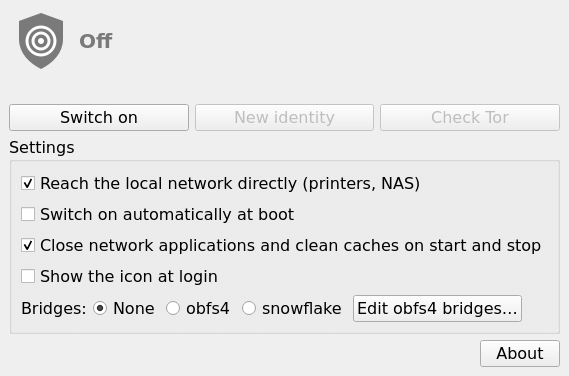
SysLinuxOS Anonimo switched off, with its settings
From a terminal:
anonimo start
anonimo status --check
anonimo identity
anonimo stop
anonimo status exits with 0 when protected, 1 on error, 2 while connecting and 3 when off. At the end of anonimo start it checks with check.torproject.org that traffic goes through Tor and exits with an error if it does not.
Settings
Direct local network: on by default, it keeps printers and NAS reachable by IP address. For anonimo the local network is 10.0.0.0/8, 172.16.0.0/12, 192.168.0.0/16, 169.254.0.0/16, fe80::/10 and fc00::/7.
Bridges: for networks that block Tor. With obfs4, enter the lines you get from bridges.torproject.org in Edit obfs4 bridges, or from a terminal with anonimo bridges --set FILE. Snowflake uses the default addresses of Tor Browser.
Switch on automatically at boot: loads the firewall at boot, before the network comes up.
Close network applications and clean caches: on by default. At every switch on and off it closes network programs and runs BleachBit, which also deletes browser history and form data, as AnonSurf did.
The same settings are available from the terminal, for example anonimo settings --lan off --bridges obfs4.
What does not work while it is on
UDP to the Internet (online games, video calls), IPv6 to the Internet, device discovery (.local), Docker containers and virtual machines.
Services of this computer (SSH, web server, file sharing) cannot answer hosts outside the local network.
Connections to the Internet already open when it switches on are cut.
Good to know
With the direct local network option on, anything sent to a host of the local network leaves outside Tor: a local HTTP or SOCKS proxy, DNS over TLS or over HTTPS to the router or a Pi-hole, a gateway. If everything must go through Tor, switch the option off.
With snowflake bridges the bridge program sends its own DNS queries and its STUN/WebRTC traffic outside Tor: someone watching the network can tell that you use snowflake, as with Tor Browser, but not what you visit.
Firefox blocks .onion names by default. To open .onion sites use Tor Browser, or set network.dns.blockDotOnion to false in about:config.
If the network stays blocked
To get the normal network back:
anonimo stop --no-close-apps
anonimo settings --boot off
If anonimo does not respond, this command removes the table for the current session only:
sudo nft delete table inet anonimo
With start at boot on, the table is loaded again at every boot until you run anonimo settings --boot off. With start at boot off, a reboot always brings the normal network back.
Debian’s Tor and removal
On the first installation, if /etc/tor/torrc was not modified, Debian’s default Tor service (tor.service) is disabled, because anonimo has its own. To remove the program:
sudo apt remove syslinuxos-anonimo
apt remove leaves tor.service disabled; only apt purge syslinuxos-anonimo enables it again.
Code and feedback
The code, the changelog and the list of what was verified are in the GitHub repository. The program is free software, GPL-3.0 or later. For reports and questions open an issue on the repository.
SysLinuxOS Anonimo secure internet browsing