

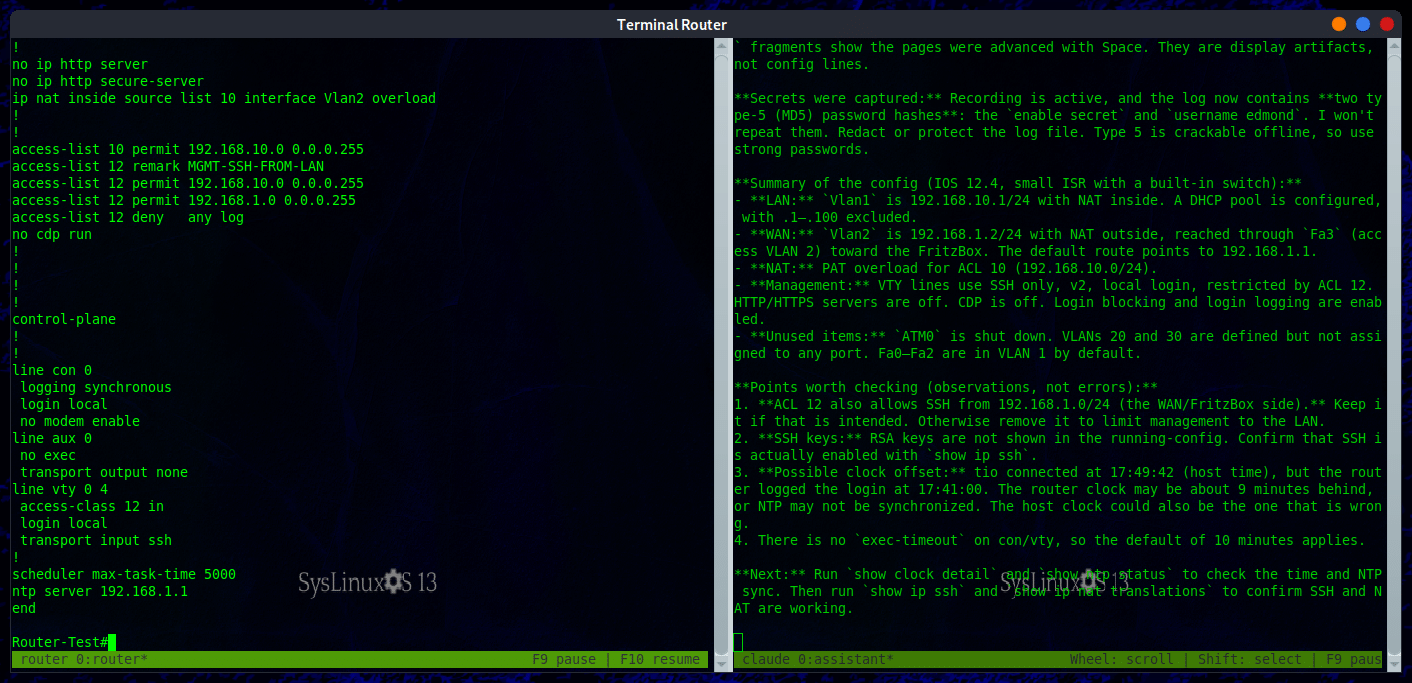
The terminal-router workspace keeps the router session and the AI observer in two independent panes.
This article follows terminal-router AI assistants on Cisco and Huawei routers. The earlier article introduced the idea of recording a terminal session and allowing Claude Code or Codex to read the log. Version 1.1.0 turns that mechanism into a complete operational workspace for system integrators and network administrators.
The Italian article is available on francoconidi.it. The source code and the technical documentation are published in the fconidi/terminal-router repository.
What changed in the new release
terminal-router opens two independent terminal widgets. The left widget is reserved for the router or switch session. The right widget runs Claude Code or Codex as an observer. The observer reads the recorded output, analyses the device state and answers questions from the operator.
The remote device is never exposed directly to the AI assistant. The operator owns the SSH or serial connection, types the commands and decides whether to apply any suggestion. The assistant does not authenticate to the router and does not need a direct channel to the device.
The new workspace also supports guarded command proposals. This feature is disabled by default. When enabled, every command group is displayed to the operator, validated and sent only after a one time confirmation code is entered.
Workspace architecture
The launcher creates a private tmux server for the workspace and two separate sessions. The router session is recorded under the user directory ~/.claude-logs. The observer session is not recorded by the workspace launcher. The observer follows a stable link to the router log belonging to that workspace.
This isolation prevents a second workspace from redirecting the observer to the wrong device. Pausing and resuming capture also preserve the correct link. The user’s global tmux configuration is not loaded into the private server used by the workspace.
Mouse behavior is deliberately different in the two widgets. In the router widget, selection and copying work as they do in a normal terminal. In the observer widget, the mouse wheel browses up to 50,000 lines of tmux history. Hold Shift while dragging to select text in the observer. Scrolling therefore does not inject arrow key escape sequences into the assistant prompt.
Quick start
After installation, the command without arguments opens the workspace and selects Claude Code when it is available. If Claude Code is not available, Codex is selected.
terminal-router
terminal-router claude
terminal-router codex
terminal-router workspace claude
terminal-router workspace codex
The commands that name an engine require that exact program. If the selected engine is missing or unauthenticated, terminal-router reports the error and does not silently replace it with the other engine.
The first launch displays a security notice. The log contains whatever is printed on screen and the captured output is sent to the AI provider through its authenticated CLI. The user must explicitly acknowledge this condition. Installing the package does not enable recording and does not automatically edit personal configuration files.
Connecting to a router over SSH
Open the SSH connection in the left widget. Host key prompts, password prompts and interaction with the remote shell remain in the router terminal.
ssh admin@192.168.1.1
When the router produces new output, the observer receives it according to the automatic analysis cadence. The operator can ask questions in the right widget, for example requesting an explanation of a routing table, a review of an ACL or an interpretation of the current interface state.
Serial console
The router widget also displays reference commands for a serial console. tio is the recommended program and is installed as a mandatory dependency. screen and picocom are optional alternatives.
tio --list
tio --baudrate 9600 --databits 8 --parity none --stopbits 1 --flow none /dev/ttyUSB0
screen /dev/ttyUSB0 9600
picocom --baud 9600 --databits 8 --parity n --stopbits 1 --flow n /dev/ttyUSB0
Depending on the adapter, the device can be /dev/ttyACM0. When available, the stable path under /dev/serial/by-id/ is preferable. With tio defaults, 115200 8N1 with no flow control, the following is sufficient.
tio /dev/ttyUSB0
Press Ctrl-t q to exit tio. Recording also works with screen and picocom, but guarded command delivery requires tio or ssh to be the foreground program.
Automatic analysis and AI context
The observer groups output after two seconds of quiet time, or after a maximum of five seconds of continuous output. At least ten seconds must pass between automatic requests. Unchanged output does not trigger a new request.
Each request contains up to the latest 128 KiB of router output and the previous exchange. This keeps enough context for typical command results without sending an unbounded session history. The visible assistant scrollback can reach 50,000 lines, which is separate from the bounded snapshot sent to the provider.
A request that has already been submitted may finish after capture is paused. Pausing prevents new automatic analysis. If the AI CLI or its authentication fails, automatic mode stops and can be enabled again after the problem is corrected.
| Observer input | Function |
|---|---|
| Question followed by Enter | Analyses the current router state and answers. |
| Empty Enter | Requests an immediate analysis. |
:auto off |
Stops automatic requests, cancels the active request and clears queued automatic work. |
:auto on |
Resumes automatic requests. |
:config on |
Enables guarded configuration for the current observer. |
:config off |
Disables guarded configuration and cancels a pending proposal. |
:apply command |
Manually stages one command for review. |
:confirm code |
Sends the displayed group once after confirmation. |
:cancel |
Discards the pending command group. |
:quit |
Closes the observer while leaving the router terminal available. |
| F9 and F10 | Pause and resume recording of the original router pane. |
Guarded configuration mode
Configuration mode is disabled at startup and remains active only for the current observer. The AI may propose commands, but the proposal is treated as untrusted input. Every line is validated, the complete group is displayed and nothing is sent until the operator confirms it.
The mode accepts up to 32 commands in one ordered group. Delivery is allowed only when the router widget has an ssh or tio session in the foreground. Shell operators, control characters and embedded newlines are rejected.
:config on
Configure interface Gi0/1 with description UPLINK and enable it

Pending router commands:
1. configure terminal
2. interface Gi0/1
3. description UPLINK
4. no shutdown
5. end

:confirm A1B2C3D4E5F6
The code is valid for 120 seconds and authorizes only the displayed group. New AI analyses wait while the proposal is pending. F9, a transport change or pausing the router pane cancels the pending group. Every line still needs to be reviewed before confirmation, especially when the device is in production.
Global recording and single session recording
terminal-router install enables recording for every interactive terminal opened by the user. It adds marked blocks to ~/.bashrc or ~/.zshrc and to ~/.tmux.conf. Each tmux pane is connected to the logger and ~/.claude-logs/latest points to the newest log.
terminal-router launch creates a self contained session for one task. Hooks are applied only to that tmux session and disappear when it ends. It does not edit ~/.bashrc, ~/.zshrc or ~/.tmux.conf. Terminator and other open terminals remain independent.
Both modes are per user and keep data inside the user home. Do not run the command as root. The configuration belongs to the calling user and sudo would target root’s home directory.

The terminal-router icon is installed in the SysLinuxOS applications menu.
Administrative commands
| Command | Use |
|---|---|
terminal-router status |
Reports active hooks, rotation, available AI programs, existing logs and current panes. |
terminal-router doctor |
Runs read only checks on setup, permissions, logs and live panes. |
terminal-router tail |
Follows the newest pane log and switches when the latest link changes. |
terminal-router pause |
Suspends capture in the current tmux pane. |
terminal-router resume |
Resumes capture in a new file. |
terminal-router menu |
Opens the configuration menu and alternate launch modes. |
terminal-router remove |
Removes hooks, backs up modified files and optionally deletes logs. |
After install, the shell shortcuts logpause and logresume are available. Detaching from tmux with Ctrl-b d does not stop recording or the observer. Use F9 or terminal-router pause when capture must stop.
Security and privacy
The log contains everything printed on screen. A password typed at an interactive SSH or sudo prompt is normally not recorded because the terminal does not echo it. Secrets that are made visible by the operator are recorded, including passwords in command arguments, tokens in HTTP headers, plaintext exported variables and the output of .env files or private keys.
The ~/.claude-logs directory uses mode 0700 and log files use mode 0600. The logger runs with umask 077. Nightly rotation removes logs older than 30 days. The directory is outside cloud synchronized folders. Pause capture before sensitive work and resume it into a new file afterwards.
The CLI keeps its normal authentication, while the observer disables shell tools and configured integrations and ignores project configuration. Codex runs read only. Use TR_CLAUDE_MODEL or TR_CODEX_MODEL to select a model. The observer language follows the system locale or can be set explicitly with TR_LANGUAGE=en.
Installation on SysLinuxOS
On SysLinuxOS the package is available in the SysLinuxOS Tools repository.
echo "deb https://fconidi.github.io/SysLinuxOS-Tools tirreno main" | sudo tee /etc/apt/sources.list.d/syslinuxos-tools.list
wget -qO- https://fconidi.github.io/SysLinuxOS-Tools/syslinuxos-archive-keyring.asc | sudo tee /usr/share/keyrings/syslinuxos-archive-keyring.asc > /dev/null
sudo apt update
sudo apt install terminal-router
terminal-router
Installation on Debian and Ubuntu
The GitHub repository publishes the Debian package and its SHA 256 checksum.
wget https://github.com/fconidi/terminal-router/releases/download/v1.1.0/terminal-router_1.1.0_all.deb
wget https://github.com/fconidi/terminal-router/releases/download/v1.1.0/terminal-router_1.1.0_all.deb.sha256
sha256sum -c terminal-router_1.1.0_all.deb.sha256
sudo apt install ./terminal-router_1.1.0_all.deb
terminal-router
To build the package from source:
git clone https://github.com/fconidi/terminal-router.git
cd terminal-router
bash build-deb.sh
sudo apt install ./terminal-router_1.1.0_all.deb
terminal-router
The final command must be run as the normal user. The main requirements are Bash, tmux 3.0 or newer, Python 3 with its standard library, tio and Terminator. Cron is recommended for log rotation. The workspace requires an installed and authenticated Claude Code or Codex CLI.
Upgrading from the 1.0 series
Users of global mode should run terminal-router install again after upgrading. The command updates only marked blocks, creates .terminal-router.bak backups and preserves surrounding settings.
An already running tmux server keeps its previously loaded hooks. Reload the configuration with tmux source-file ~/.tmux.conf when needed. In existing panes, use terminal-router pause and terminal-router resume. For a single task, start a fresh terminal-router launch session.
Conclusion
terminal-router 1.1.0 turns terminal recording into a complete AI assisted operating environment for router and switch work. Separating the device pane from the observer pane preserves human control while the log gives the assistant the real context of the session. Guarded configuration adds a controlled path for proposing commands without turning the assistant into an autonomous administrative connection.
For the full documentation, read the terminal-router GitHub repository and the manual installed with the package through man terminal-router.