

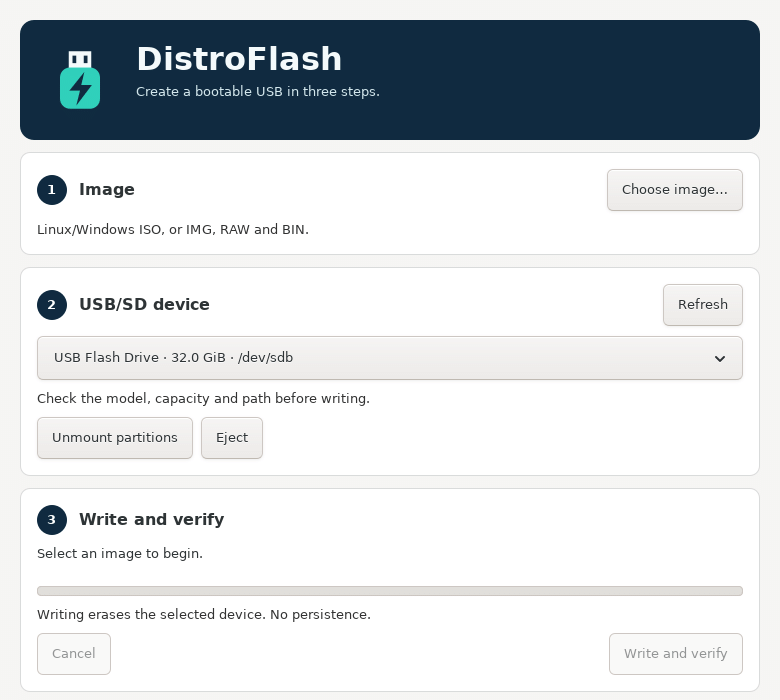
DistroFlash is a native Linux desktop application that creates bootable USB drives and SD cards from Linux and Windows images. It uses a three-step GTK interface: choose an image, select the device, write and verify. It runs as a normal user, without sudo: UDisks2 and Polkit authorize the storage operations. No telemetry and no online account.
Overview
Linux images: hybrid ISO files that boot from USB, and uncompressed IMG, RAW or BIN images.
Windows images: standard Windows 10/11 x64 ISOs with UEFI boot files. The drive gets a GPT partition table, a main NTFS partition holding the original Windows files, and a small FAT EFI System Partition with the bundled UEFI:NTFS loader and NTFS driver. Files above 4 GiB are copied whole: no WIM splitting, no recompression, no multi-gigabyte temporary files.
Verification: every written file is read back and checked with SHA256, including Windows archives and the UEFI:NTFS boot components. An optional deep check also detects corruption inside the source Windows archives.
Safeguards: internal disks, devices with active storage mappings, Btrfs filesystems, system mounts and the device holding the source image are never offered as targets.
Languages: English, Italian, French, German and Spanish, following the system language.
Windows support targets UEFI x64. Windows legacy BIOS, ARM64, custom ISOs and already-split WIM layouts are not supported. Firmware and Secure Boot compatibility depend on the original Windows boot files and on the firmware. No persistence.
Installing from the APT repository
DistroFlash is available for SysLinuxOS 13 and Debian 13 and compatible distributions. If the SysLinuxOS Tools repository is already configured, just run:
sudo apt update
sudo apt install distroflash
To add the repository, follow the official instructions. The quick method uses the script that configures the APT source and the signing key:
curl -fsSL https://fconidi.github.io/SysLinuxOS-Tools/client/install-repo.sh | sudo bash
sudo apt update
sudo apt install distroflash
After installation DistroFlash appears in the applications menu, in the SysLinuxOS Tools folder, or you can start it from a terminal with distroflash. Do not launch it with sudo, and make sure a Polkit authentication agent is running in your session.
Installing from the Debian package
Alternatively, download distroflash_0.2.2_all.deb from the GitHub release 0.2.2, open a terminal in the file’s folder and run:
sudo apt install ./distroflash_0.2.2_all.deb
The package requires Python 3.11 or later, PyGObject, GTK 3, UDisks2, ntfs-3g and wimtools: APT installs the dependencies automatically.
To try it from source, download the repository and, from its folder, run:
sudo apt install python3-gi gir1.2-gtk-3.0 udisks2 dosfstools ntfs-3g wimtools util-linux
PYTHONPATH=src /usr/bin/python3 -m distroflash
How to create a bootable USB drive with DistroFlash
1. Choose the image. Press Choose image… and select the ISO or image. For Windows ISOs the archive metadata is checked before any device is erased. In the chooser you can enable the Deep Windows integrity check: it is slower, but it verifies the whole archive, including decompression and internal checksums.
2. Choose the USB/SD device. Check the model, capacity and path in the list. If the drive is mounted, use Unmount partitions. After connecting or removing a device press Refresh.
3. Write and verify. Press Write and verify and type the displayed device path to confirm the erasure. Wait for the verification to finish, then use Eject to remove the drive safely.
Warning: all data on the selected device is erased. If you cancel, the drive is left incomplete and must be recreated before use.
Useful details
distroflash --list lists the eligible USB/SD devices without changing them, and distroflash --version prints the version. Messages returned by system services and external tools follow their own language.
If you need a live USB drive with persistent data and encryption, read the guide to DistroClone USB.
Source and license
The project is developed by Franco Conidi and released under GPL-3.0-or-later. UEFI:NTFS and the NTFS driver are third-party components: source and license information is in the THIRD-PARTY.md file of the repository.
Source: GitHub repository.
APT installation and updates: SysLinuxOS Tools APT repository.
Leggi l’articolo in italiano: DistroFlash crea USB avviabili Linux e Windows.
DistroFlash creates bootable USB drives for Linux and Windows