

A WiFi access point installed above a suspended ceiling can keep working for years while its physical location becomes difficult to find. Knowing the network name is not enough when several devices broadcast the same SSID. SysLinuxOS Wifi Analyzer discovers WiFi radios and lets you follow the signal of a selected radio using a gauge, measurement history and audible guidance.
Version 2026.10.3 is available for SysLinuxOS 13 and Debian 13. The interface supports English, Italian, French, German and Spanish, automatically following the desktop session language.
What it is for
Use the application to locate a concealed access point, observe how reception changes as you move through a room and distinguish radios sharing a network name. The target is selected by its BSSID, the identifier of an individual radio. One physical access point can expose several BSSIDs across different bands.
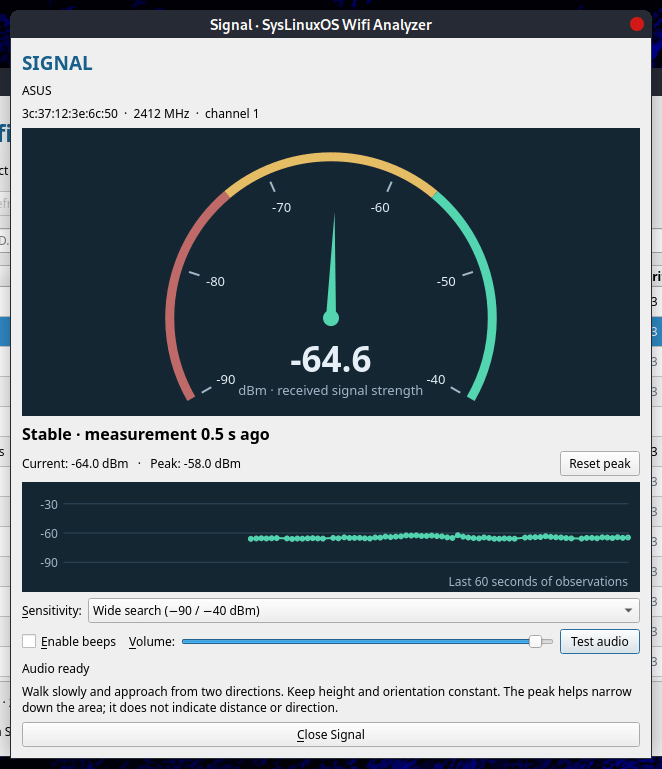
The Signal window shows received signal strength in dBm, an analog gauge, the strongest recorded sample and recent history. Beeps become more frequent as the signal grows stronger, allowing you to follow changes without constantly watching the screen.
The application does not calculate distance or direction. Obstacles, metal surfaces and reflections can shift the strongest-signal location. Use the results to narrow the area to inspect above a ceiling; they cannot guarantee the correct individual panel.
Requirements
You need SysLinuxOS 13 or Debian 13 with a graphical desktop, a WiFi adapter recognized by iw and a polkit authentication agent in your desktop session. MATE and GNOME normally include one. The APT package handles the Python, PyQt5, multimedia, iw and pkexec dependencies.
A dedicated USB WiFi adapter may provide steadier scanning while your main adapter maintains its connection. The application does not change adapter mode or disable NetworkManager.
Install from the APT repository
If the SysLinuxOS Tools repository is already configured, run:
sudo apt update
sudo apt install syslinuxos-wifi-analyzer
To add the repository, follow the official instructions. The quick method uses the official script to configure the APT source and signing key:
curl -fsSL https://fconidi.github.io/SysLinuxOS-Tools/client/install-repo.sh | sudo bash
sudo apt update
sudo apt install syslinuxos-wifi-analyzer
Once the repository is configured, subsequent updates are delivered through APT.
Install the Debian package
Alternatively, download syslinuxos-wifi-analyzer_2026.10.3_all.deb from the 2026.10.3 GitHub release. Open a terminal in the download directory and run:
sudo apt install ./syslinuxos-wifi-analyzer_2026.10.3_all.deb
Launch and start scanning
Open the application from the SysLinuxOS Tools menu or launch it from a terminal:
syslinuxos-wifi-analyzer
Run it as your normal desktop user. Only scanning requires administrator authentication through polkit; the interface and audio remain in your user session.
1. Choose the adapter. Select your WiFi adapter, click Start scan and confirm the authentication prompt.
2. Choose the radio. Identify the BSSID of the access point you want to follow. Avoid relying only on the network name when several devices share the same SSID.
3. Open Signal. Select the radio and click Signal…. Scanning focuses on the target frequency and opens the gauge and history window.
Reading signal strength and using beeps
dBm readings are negative: −50 dBm is stronger than −80 dBm. The peak records the best raw sample received; the gauge, history and beeps use a lightly smoothed signal.
Select Enable beeps, adjust the volume and click Test audio to check your audio output. The tone stays at 880 Hz; its cadence changes from one beep every 2.2 seconds to about six beeps per second.
Walk slowly, keeping the receiver at a consistent height and orientation. When you reach a strong-signal area, cross it again from a perpendicular direction. Click Reset peak at the beginning of a new pass. Select Near the AP sensitivity to distinguish variations in already strong signals.
Close Signal to return to discovery across all channels. If the access point changes channel, find it again in the refreshed list.
Try it without hardware
syslinuxos-wifi-analyzer --demo
Demo mode uses simulated radios and signal changes. It lets you try the interface, filters, gauge and audio without performing real scans or requesting privileges.
Troubleshooting
No adapter detected: check the connection and driver. Run iw dev to list recognized interfaces. If WiFi is disabled or blocked, enable it in desktop settings.
No authentication prompt: check that a polkit authentication agent is running in your graphical session. Cancelling authentication prevents the scanning session from starting.
Beeps pause: the application pauses audio when the target disappears, a scan fails or no fresh sample arrives for four seconds. This avoids guiding you with stale readings. A busy adapter or slow scans can also produce pauses.
Stopping takes a moment: each iw invocation has a 15-second timeout. Stopping or closing the application may wait for that invocation to finish.
Source code and license
The project is developed by Franco Conidi and distributed under GPL-3.0-or-later. Its BSS parser is derived from Sparrow WiFi by ghostop14; the interface, tracking, audio and packaging are dedicated to SysLinuxOS Wifi Analyzer.
Source code and IT/EN documentation: GitHub repository.
Packages: GitHub releases.
APT installation and updates: SysLinuxOS Tools.
SysLinuxOS Wifi Analyzer Installation and Usage Guide