

SysLinuxOS ships two Conky themes designed to sit together on the desktop: syslinuxos-ring-conky, which draws CPU, RAM, disks, network, clock and battery as animated rings in the middle of the screen, and syslinuxos-conky-window, a column panel on the right-hand side with the numeric detail. The first is the at-a-glance view, the second is the detail. They install, start and stop independently, and adapt on their own to the screen resolution, the number of CPU cores and the network card in use.
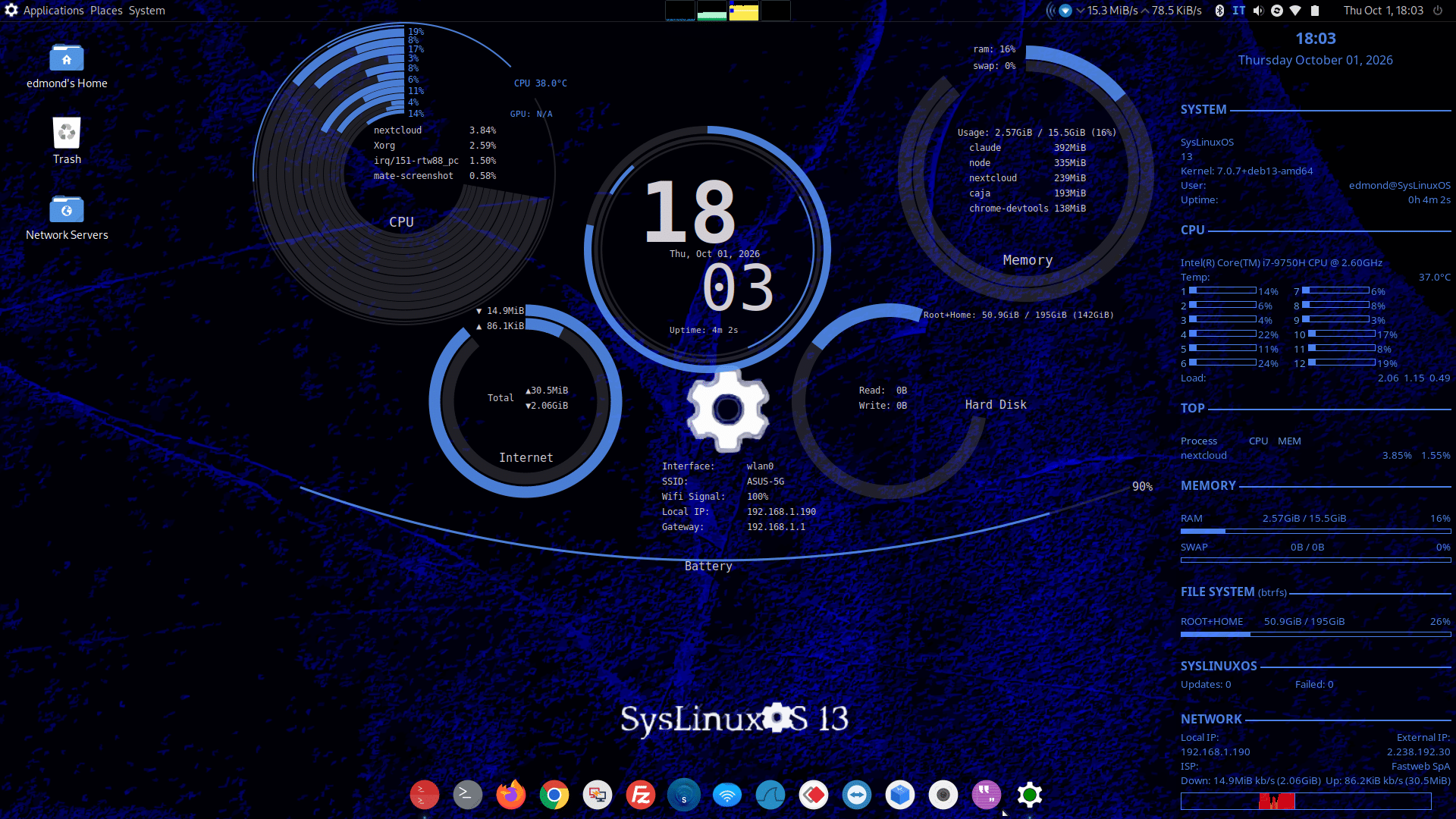
The SysLinuxOS 13 desktop: syslinuxos-ring-conky in the middle, syslinuxos-conky-window on the right side.
The ring theme: syslinuxos-ring-conky
It is a fork of Auzia Conky (GPL-3.0) with auto-scaling: the scale factor is min(width/1920, height/1080), clamped between 0.5 and 3.0, so at 1920×1080 the layout is identical to the original and on other resolutions it stays proportional. It shows a ring for every CPU core (the core count is detected at boot), CPU and GPU temperature when available, the heaviest processes, RAM and swap, the clock, a disk ring with read and write activity, network traffic and totals, the connection details (interface, SSID, signal, local IP, gateway) and the battery, which only appears if the machine has one.
The disk ring shows a single “Root+Home” ring when / and /home are on the same file system, as with the btrfs subvolumes of SysLinuxOS. The network card follows the default route and is re-checked every 10 seconds, so switching from Wi-Fi to cable needs no restart.
The per-core rings adapt to the thread count: for 2, 4, 6, 8, 10 and 12 threads the hand-tuned layouts are kept, for any other count, such as 16, 20 or 32, the layout is computed with a formula, with one ring per thread and the percentage labels thinned out so they never overlap.
The side panel: syslinuxos-conky-window
The panel takes the right-hand side of the desktop and groups the information into sections: SYSTEM (release, kernel, user, uptime), CPU (model, temperature turning orange above 70°C and red above 85°C, one bar per thread), TOP (the heaviest processes), MEMORY (RAM and swap), FILE SYSTEM and NETWORK (local and external IP, provider, speed, totals and graphs).
The layout adapts to the thread count: up to 6 threads the bars fit in one column with three processes in TOP, from 7 to 12 they go in two columns and above 12 in three or more columns (at most 8 rows), and in that case the TOP section is dropped, since the ring already lists the heaviest processes, so the panel never runs off the screen. The CPU temperature, GPU and fan rows only appear when the machine exposes those values. A row named after the distribution (SYSLINUXOS on SysLinuxOS, DEBIAN on Debian) summarises pending APT updates, failed systemd units and, when the user can read them, the number of snapper snapshots. Here too / and /home become a single row when they share the file system, and the network card is re-read every 10 seconds.
A privacy note: the external IP and the provider are fetched with curl from api.ipify.org and ipinfo.io, so the panel makes those two outbound requests.
Installation
With the SysLinuxOS APT repository (if it is not configured yet, the official script adds it):
curl -fsSL https://fconidi.github.io/SysLinuxOS-Tools/client/install-repo.sh | sudo bash
sudo apt install syslinuxos-ring-conky syslinuxos-conky-window
The panel used to be called conky-window. Anyone with the old package is migrated by apt upgrade thanks to a transitional package with the same name. Paths and scripts did not change, so the menu entries, commands and variables stay the same. The dependency is conky-all; for a complete result you also want lsb-release, curl, lm-sensors and the X11 tools x11-utils and x11-xserver-utils, which the package recommends and apt installs by itself.
Usage
The entries are in the Applications menu, under System Tools: Conky-ring-start, Conky-ring-stop, Conky-window-start and Conky-window-stop. From a terminal:
/opt/scripts/conky-ring-start.sh
/opt/scripts/conky-ring-stop.sh
/opt/scripts/conky-window-start.sh
/opt/scripts/conky-window-stop.sh
To start them automatically at every login, copy the entries into the session autostart folder:
mkdir -p ~/.config/autostart
cp /usr/share/applications/conky-ring-start.desktop /usr/share/applications/conky-window-start.desktop ~/.config/autostart/
Useful variables
Set them in front of the start command. CONKY_RING_SCALE and CONKY_WINDOW_SCALE force a scale factor different from the one computed from the resolution, CONKY_NET_INTERFACE pins a network card instead of following the default route.
CONKY_RING_SCALE=1.5 /opt/scripts/conky-ring-start.sh
CONKY_WINDOW_SCALE=1.2 /opt/scripts/conky-window-start.sh
CONKY_NET_INTERFACE=eth0 /opt/scripts/conky-window-start.sh
In the panel, the two graphs at the bottom of the NETWORK section stay tied to the network card detected at startup: if you switch cards while it is running, speed and totals follow, the graphs do not, until you restart it.
What about Debian?
The two packages do not depend on SysLinuxOS components. I tried them on a clean Debian 13: installation from the repository, with the recommended dependencies, and start of both on an X11 session. I have not verified Wayland sessions, such as the default GNOME on Debian: conky runs there only through XWayland and the “below other windows” placement and transparency may not work. To remove them: sudo apt remove syslinuxos-ring-conky syslinuxos-conky-window.
Sources and releases on GitHub: syslinuxos-ring-conky and syslinuxos-conky-window.
Conky themes for SysLinuxOS: syslinuxos-ring-conky and syslinuxos-conky-window