SysLinuxOS Boot Repair Guide to GRUB Recovery from Live USB
Restore GRUB from a live USB with SysLinuxOS Boot Repair: system analysis, BIOS and UEFI boot, LUKS partitions, Btrfs, and snapshots.

Restore GRUB from a live USB with SysLinuxOS Boot Repair: system analysis, BIOS and UEFI boot, LUKS partitions, Btrfs, and snapshots.
Install SysLinuxOS Wifi Analyzer and locate an access point using its BSSID, signal strength, measurement history, and audio guidance.
Install NVIDIA drivers and CUDA on SysLinuxOS 13 and Debian 13 with syslinuxos-nvidia-setup: GPU detection and kernel module selection.
Install Docker from its official repository on SysLinuxOS 13 and resolve service startup failures with the commands in this guide.
Set up syslinuxos-ring-conky and syslinuxos-conky-window to monitor CPU, memory, disks, and network activity on the SysLinuxOS desktop.
Restore GRUB on SysLinuxOS with LUKS-encrypted partitions. Follow the live recovery steps to access your installation and repair Linux boot.
Use terminal-router 1.1.0 with Cisco and Huawei routers: separate router and AI panels, session observation, configuration, and commands.
Restore GRUB on SysLinuxOS with Btrfs subvolumes. Use a live environment to access your installed system and repair the Linux bootloader.
Explore SysLinuxOS 13.3 for system integrators: MATE and GNOME editions, integrated AI tools, and improvements to system recovery and networking.
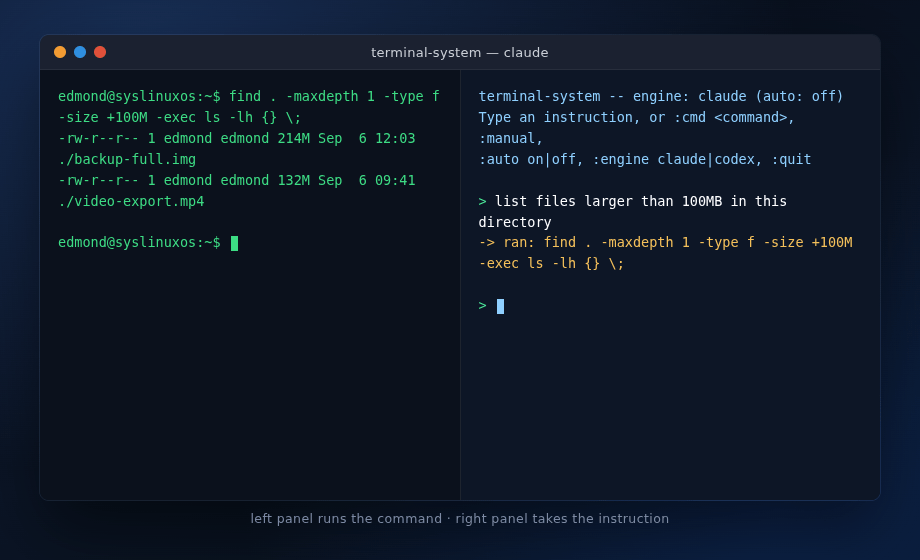
Use terminal-system with Claude Code or Codex to turn Linux administration requests into shell commands, with confirmation before execution.
