

SysLinuxOS Care brings resource monitoring and common maintenance tasks into one desktop application. You can inspect CPU, memory, disk and network activity, review files before deleting them, and manage startup entries, processes, services and installed packages. This guide covers version 0.1.5 for SysLinuxOS 13 and Debian 13 on amd64 systems.
Install SysLinuxOS Care
If the SysLinuxOS Tools repository is already configured, install the application with APT:
sudo apt update
sudo apt install syslinuxos-care
If the repository is not configured, follow its official setup instructions. Alternatively, download syslinuxos-care_0.1.5_amd64.deb from the GitHub 0.1.5 release and run this command from the download directory:
sudo apt install ./syslinuxos-care_0.1.5_amd64.deb
Open SysLinuxOS Tools → SysLinuxOS Care from the menu, or run syslinuxos-care in a terminal. Start the interface as your normal user. System maintenance actions show a desktop authorization prompt when privileges are needed.
Overview and disk space
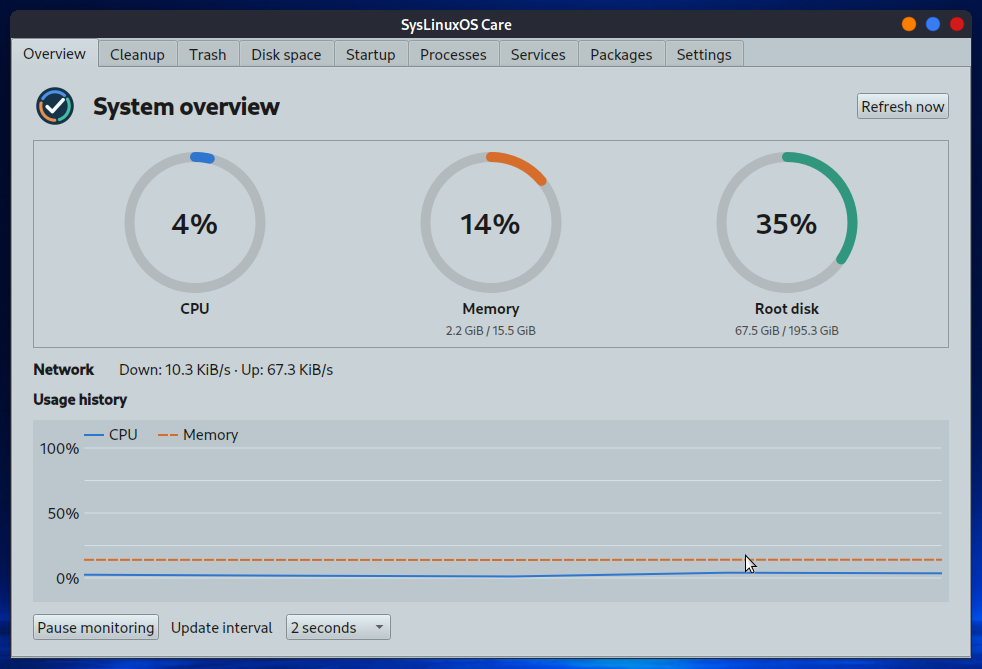
The Overview tab shows current CPU, memory, disk and network use. Charts retain recent CPU and memory history. You can pause monitoring, refresh the readings or change the interval. In Disk space, select a folder to see its contents grouped by the first directory level. This is analysis only; it does not delete anything.
Cleanup: individual categories or ALL
In Cleanup, choose a category or ALL, scan and review the paths and sizes before selecting files. ALL combines every cleanup category in one preview. Select individual items or use Select all, then choose Remove selected and confirm. Nothing is selected automatically. ALL does not include Trash, which has its own tab.
Cleanup covers thumbnail and font caches, completed APT package archives, and caches from standard local Firefox, Chromium and Google Chrome profiles. Browser cookies and Chromium/Chrome history are separate choices. Close the browser before scanning or cleaning its profile. Deleting cookies can sign you out of websites; deleting Chromium/Chrome history also removes its download list. Firefox history is excluded because its database also stores bookmarks.
APT archives appear as individual .deb files and require authorization for removal. In-progress downloads are excluded; a removed cached package may need to be downloaded again. If you cancel cleanup, the application stops after the current file. Items already removed are not restored.
Trash and system management
The Trash tab scans the home trash and supported mounted-volume trash locations. It shows each item’s original location and requires selection and confirmation before permanent removal. Items are not selected automatically.
Startup enables or disables application startup entries for your session. Processes lets you search and sort processes and request termination of a process owned by your user. Services can start, stop or change the startup setting of user and system services. System changes may require authorization. Changing startup settings does not start or stop a service immediately.
In Packages, find an installed package and choose Preview removal to inspect the complete APT plan. Removal is available only after you review that plan and confirm the action. If the plan changes, you must preview it again. Check for additional packages or dependencies that APT proposes to remove.
Languages and precautions
The interface follows the system language and supports English, Italian, French, German and Spanish. In Settings, you can choose a language for the next launch and retain a preferred monitoring interval.
Cleanup and trash removal are permanent. Check the preview and confirmation dialog carefully, especially when using ALL. SysLinuxOS Care does not create backups or promise to erase every trace of browsing. If an action is unavailable, read its status message and check whether the browser is closed or the desktop authorization agent is running.
If you care about system maintenance, the SysLinuxOS Tools repository also offers SysLinuxOS Job Scheduler, a graphical editor for user and system cron jobs, and SysLinuxOS Service Manager, for managing system and user services and startup. Install them with sudo apt install syslinuxos-job-scheduler syslinuxos-service-manager; the full package list is on the SysLinuxOS Tools APT repository page.
For more SysLinuxOS tools, read the guide to SysLinuxOS Boot for GRUB menu and Plymouth splash settings, and the one about DistroFlash to create bootable USB drives and SD cards from Linux and Windows images.
Downloads and source code
Repository and documentation
Version 0.1.5 release and Debian package
SysLinuxOS Tools APT repository
SysLinuxOS Care is free software under GPL-3.0-only. Code and original logo: Franco Conidi.
Leggi l’articolo in italiano: SysLinuxOS Care: pulizia, monitoraggio e gestione del sistema.
SysLinuxOS Care: System Cleanup, Monitoring and Management