

ethtool-GUI brings Ethernet information and settings usually accessed through ethtool into a GTK window. Simple is for a quick link check; Advanced provides thirteen tabs for diagnosis, configuration and boot settings. Ordinary readings run as your user. Changing a network interface or reading protected data requests authorization through polkit.
ethtool-GUI: finding your way around the window
Select an interface in the left pane. Show all interfaces also lists interfaces outside the active wired connection. Simple and Advanced change the displayed view without applying a setting. Advanced refreshes the selected tab when you enter it. The network card and driver determine which controls work; unsupported fields remain visible with an explanation.
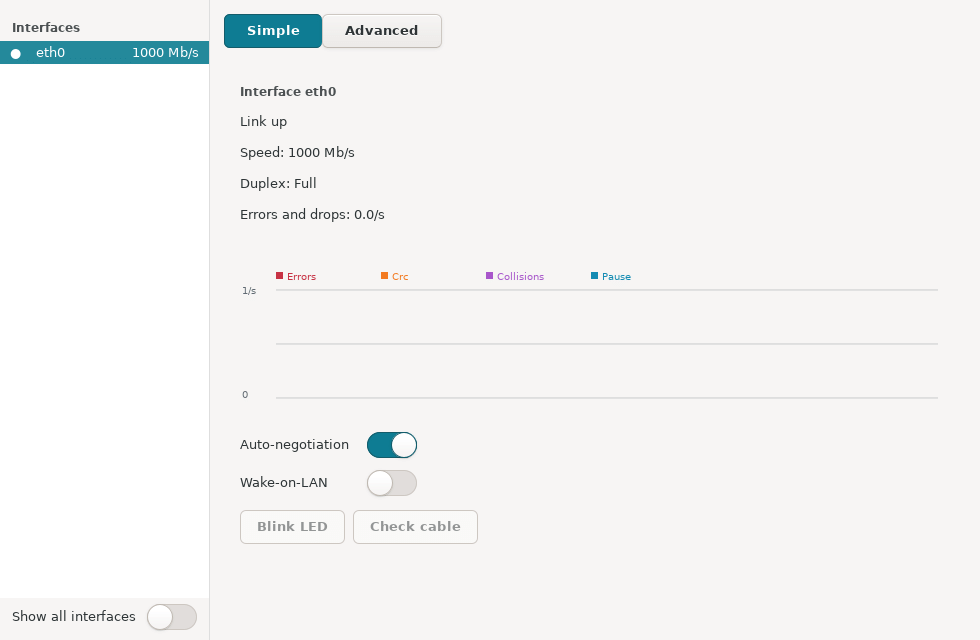
Simple view: status and common controls
The page summarizes link state, negotiated speed, duplex, and the rate of errors and dropped packets. Its graph follows counter rates, while diagnostic suggestions help interpret a missing or degraded link. The autonegotiation switch changes link negotiation. Wake-on-LAN may need an authorized read when the driver hides its capabilities from ordinary users. LED identification and cable checking are available only on supported hardware.
A link-affecting change starts a 15-second confirmation. Keep retains it; Revert restores the previous value immediately; otherwise restoration happens automatically when time expires. Keep and save for boot also needs a compatible persistence backend. Read the window’s warning before changing the connection used to administer the machine.
Advanced view: all thirteen tabs
Link
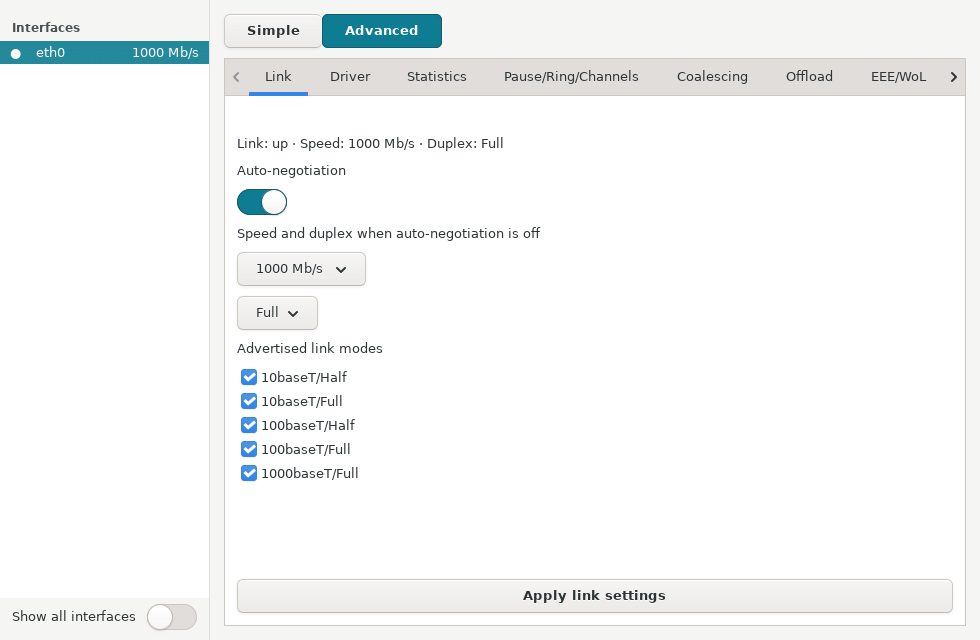
Shows current link state, speed and duplex, autonegotiation, and supported and advertised modes. With autonegotiation on, select the modes to advertise; with it off, manual speed and duplex controls become available. Apply link settings uses the same timed recovery as Simple.
Driver
Collects driver data, including its name, version and firmware where reported. Check it before interpreting missing hardware capabilities or driver-specific errors.
Statistics
Shows NIC counters and a live rate graph for errors, CRC, collisions and pause events where provided. Missing counters are left missing rather than inferred.
Pause/Ring/Channels
Groups flow-control pause settings, RX/TX ring sizes and channel or queue counts. The interface supplies available controls and maximum values; only selected changes are applied.
Coalescing
Exposes interrupt coalescing parameters, such as delays and packet thresholds when supported. These affect the balance between latency and CPU work, so record the initial values before changing them.
Offload
Lists the offload features reported by ethtool. Features fixed by the driver or unavailable for editing remain readable but cannot be toggled; Apply sends only permitted changes.
EEE/WoL
Combines Energy Efficient Ethernet and Wake-on-LAN settings. Read with authorization retrieves WoL capabilities when an ordinary read omits them. Wake-on-LAN also depends on NIC support and power remaining available to the port after shutdown.
RSS
Displays Receive Side Scaling configuration and RX classification rules. This is a diagnostic read, with authorization requested when required to retrieve the data.
SFP
Reads optical module information and, where exposed, diagnostics such as temperature and optical power. A missing compatible module or restricted driver access is reported instead of displaying invented measurements.
Tests
Offers LED blinking, online and offline self-tests, and cable testing. Offline and cable tests require a separate confirmation because they may disrupt the link. Cable results are also shown by pair where available. Driver support determines the available tests.
Dump
Provides explicit read-only actions for EEPROM, register dumps and PHY statistics. These are raw diagnostic outputs and may require authorization.
Snapshot
Saves a snapshot of interface settings. Select two snapshots to compare them and export their differences as text. This records what actually changed before and after an adjustment.
Persistence
Read boot settings compares current values with those saved for startup. If a compatible backend is available, you can make settings persistent or remove a configuration managed by the application. NetworkManager or systemd .link files are used according to the interface’s actual manager; the table highlights differences between current and boot values.
APT and .deb installation
After configuring the SysLinuxOS-Tools APT repository, install the package:
sudo apt update
sudo apt install ethtool-gui
Alternatively, download ethtool-gui 0.1.6 from GitHub Releases and install the file from your download directory:
sudo apt install ./ethtool-gui_0.1.6_all.deb
The application requires SysLinuxOS 13, Debian 13 or a compatible system, Python 3.11 or newer, GTK 3, ethtool, polkit and systemd. NetworkManager is recommended for boot settings on interfaces it manages. Launch from the SysLinuxOS Tools menu or run ethtool-gui. The interface is available in English, Italian, French, German and Spanish.
Precautions and related tools
Cable tests, offline self-tests and link changes can interrupt connectivity. Optical readings and some controls need compatible hardware and drivers. To identify the switch port connected to an Ethernet interface, see the SysLinuxOS Network Neighbors guide; to explore hosts and services on the LAN, see the LAN Discovery guide.
Downloads and source code
Source and documentation are in the ethtool-GUI repository. Version 0.1.6 is available from the GitHub release and the SysLinuxOS-Tools APT repository.
Read the article in Italian: guida a ethtool-GUI in italiano.
ethtool-GUI: Ethernet diagnostics and settings